Rooms with the right details
Present room types, capacity, amenities, and photographs supplied by your property. Explain differences between rooms so guests can make a useful enquiry.

Show rooms, property photographs, amenities, location information, and contact details with a hotel website.
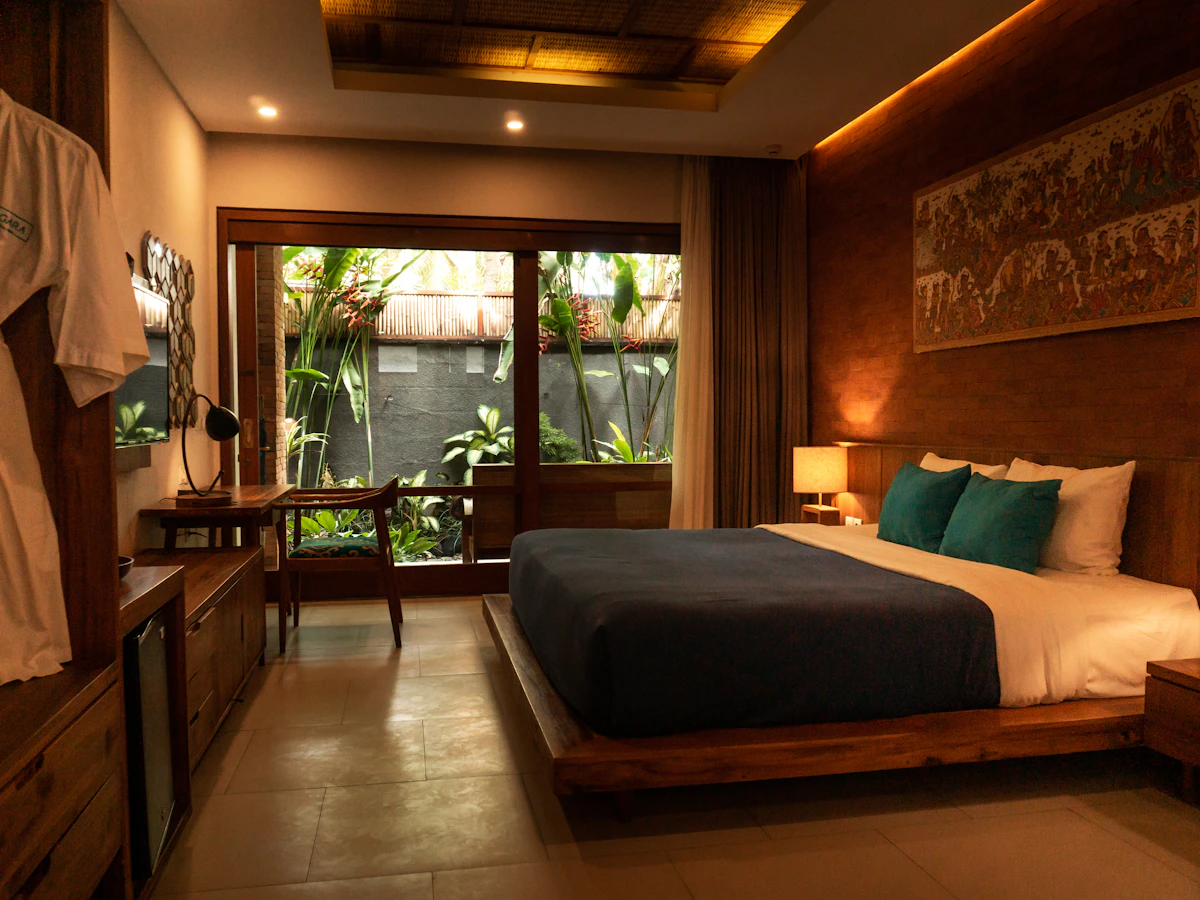
This hotel and homestay website gives guests a clear introduction to your property. Bring room information, photographs, amenities, and travel details together so visitors can understand the stay you offer.
Present room types, capacity, amenities, and photographs supplied by your property. Explain differences between rooms so guests can make a useful enquiry.
Introduce nearby attractions and practical travel information. Show your address, directions, arrival guidance, and any property policies guests should know before contacting you.
Provide contact options for dates, group sizes, and room preferences. Publish rates and inclusions only where your team can keep them current.
A useful website answers the questions people have before they contact you. Here is how the content and structure can support your business.
Present each room category with its own photographs, bed arrangement, occupancy, amenities, and bathroom details. Explain meaningful differences between categories rather than repeating the same description. Guests comparing a short work trip with a family stay should be able to understand which room suits them before contacting your reservations team.
Describe breakfast arrangements, parking, reception hours, accessibility information, and other facilities available at the property. Add accurate directions and useful arrival landmarks. Publish check-in and check-out information alongside the policies approved by your team, and distinguish facilities included in the stay from services that may carry an additional charge.
Ask guests to share their dates, guest count, and preferred room category when enquiring. Explain that rates and availability are confirmed by the hotel unless a live booking system is connected. If a booking engine is needed, identify the provider and integration requirements before promising instant reservations or online payments.
Room types, property photos, amenities, current policies, location details, and the contact used for booking enquiries.
Your branding, photographs, and business information give your website a familiar identity for your customers.
We shape the website around the information your customers need and the way your team handles enquiries.
Tell us about your business, the people you serve, and the questions you answer most often. Together we identify the pages, contact routes, and any additional integrations needed. Confirming these requirements early gives the design and content a clear direction.
Collect your photographs, service details, contact information, and brand assets. Review the page copy with the person who knows the business best, checking names, prices, schedules, and descriptions. Real, accurate information makes the finished website more useful than placeholder content.
Decide who will report changes to your services, opening hours, offers, or team. Agree how updates will be handled under your chosen package and review time-sensitive information regularly. A website remains helpful when its published details match what customers will find when they contact you.
Practical answers to help you get the most from your showcase website.
Show room photographs, capacity, amenities, and any differences between room types. Keep rates, inclusions, and property policies clear and current so guests know what to ask about.
Yes. You can publish date-specific rates or invite guests to request a quotation. Clearly identify the dates and inclusions for any advertised offer, and update expired rates so visitors are not comparing outdated information.
Yes. Your website and profile can point customers to consistent business details, your location, and contact options. Keep the business details consistent across both. Explore Google Business Profile assistance.
Use your logo, photographs, service or product descriptions, and current contact details. Clear, accurate content helps visitors recognise your business and understand what you offer. View the website plans and package details.
Give your business a clear, professional presence online. Explore website features and choose the plan that suits your needs.